|
Internet Sources of Czech and Moravian Church Record Images
There are few Internet records of Czech and Moravian churches that have a computer-searchable index. For the most part, you will be paging through digitized records of church books. However, some of those books have hand-written indexes.
I rely very heavily on Google Translate. I keep a separate window open, sometimes more than one, so that I can copy and paste text into Google Translate. I also paste the URL of a web site, and Google Translate translates the web page -- and any web pages that you go to by clicking one of the links on the translated web page. The translations are rough, but I can usually understand the meaning, even if the translation distorts things a bit. The records themselves are in Latin, German and Czech, depending on when they were created.
|
The records of the various parishes of the Czech Republic prior to 1900 are held in the various regional archives.
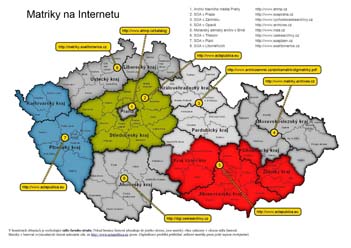
Click on map for full image on ActaPublica web site
|
IMPORTANT NOTE: Actapublica.eu no longer has the archive for Western Bohemia nor the archive for Central Bohemia, so that the URLs on the above map are out of date. The list below has the correct URLs. But the text in the sections below has not yet been modified to keep up with these two changes.
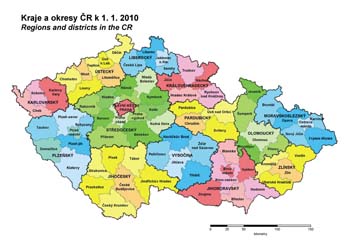
While the country has 14 regions (13 kraje + Prague), there are only eight archives (listed at the top right of the above map). Note that the archival boundaries do not necessarily follow the boundaries of the regions (kraj). So some regions have their records in more than one archive. In particular, Kraj Vysočina has records in three different archives. The districts (okres) are not split between archives; thus all the records for a district are at the same archive.
So the following sections have links to and information about the online digital archive web sites, plus another link and information about FamilySearch's holdings of Czech record images. Note that FamilySearch also has an excellent set of web pages on Czech research.
The numbers in the following list correspond to the numbers in the map, except for the last number which is for the FamilySearch web site. The sections below give more specifics about how to use each web site.
- Prague City Archive
- SOA Praha: Central Bohemia (green area in map) -- http://ebadatelna.soapraha.cz
- SOA Zamrsk: Eastern Bohemia and Havlicku Brod district of Kraj Vysočina -- http://vychodoceskearchivy.cz/zamrsk
- Czech Silesia and Northern Moravia
- Southeastern Czech Republic (red area in the above map) -- http://actapublica.eu
- SOA Trebon: Southern Bohemia and Pelhřimov district of Kraj Vysočina -- DigiCesky: Digital Archive web site of the Třeboň Archive
- SOA Plzen/Portafinum: Western Bohemia (blue area in map) -- http://www.portafontium.cz
- Northern Bohemia -- Litomerice Archive website
- FamilySearch - some Northern, Eastern and Southern Bohemia
ActaPublica.eu
- Web Site Languages
- Areas Covered
- Central Bohemia (Středočeský Kraj): Státní oblastní archiv v Praze (State Regional Archive at Prague, referred to as SOA Praha)
- Western Bohemia (Plzeňský Kraj, Karlovaraký Kraj): Státní oblastní archiv v Plzni (State Regional Archive at Plzeň, referred to as SOA Plzeň)
- Southeastern Czech Republic: Moravský zemský archiv Brno (referred to as MZA Brno)
- Kraj Vysočina - the three southeastern of the five districts of the region
- Southern Moravia (Jihomoravský Kraj)
- Olomoucký Kraj - only the district of Prostĕjov
- Zlínský Kraj - the southwestern three of the four districts
- Diözesanarchiv St. Pölten (St. Pölten Diocesan Archive - western Austria)
- Registration Required: No - While registration was required prior to 1 Oct 2011, registration is no longer required for viewing and searching church record images. Registration is only required for posting notes to the community forum.
There appears to be a complete inventory of all known record books. (Each line of the "Matriky" is a record book.) They are listed in order (when you click on "Matriky" and choose the archive you are searching) by church, showing also the okres. So for very small towns, you do need to figure out which church they went to, since the small town with no church will not be listed. If there are images, then there will be a magnifying glass icon that you can click on to view the images. In some cases, there are also star, circle and cross icons. These indicate that the book has and index (or in some cases is entirely an index book): star = birth, O = marriages, + = deaths). If you hove your mouse over one of the icons, it will show which years the index covers.
If there is a "Strany" column, it lists the number of pages in the book. Unfortunately, there are many with zero, since this is an incomplete resource for now.
Click the "Ohdlásit" tab to log out of ActaPublica.
|
DigiCesky - Digital Archive of the
Státní oblastní archiv v Třeboni (State Regional Archive at Třeboň)
- Web Site Languages
- Czech
- German
- English
- Spanish
- Areas Covered
- Southern Bohemia (Jihočeský Kraj)
- Registration Required: No
This is the best of the six web sites. That is not just because it is in English. Compared to other sites, this site has more complete holdings of parish registers, has many other online record sources, and is very elpful in its navigation to specific towns' records. You are fortunate if your records are at this archive.
|
State Regional Archives in Zámrsk
- Web Site Languages
- Areas Covered
- Eastern Bohemia (Východočeský)
- Krákovéhradcký Kraj
- Pardubický Kray
- Kraj Vysočina - only the northernmost district
- Registration Required: No
This site works very differently from all the others. So here is how to find (1) whether they include your town, (2) whether they have yet digitized your town, and (3) the digital images of the records that include your town. You do need to be a bit computer savvy and to have a computer with good horsepower and disk space and a high speed internet connection. Also, this site has been prone to changing their web addresses, so that earlier versions of my own web page had links to it that no longer worked. So the following is going to be a bit tedious, but it will probably still work even if direct links have changed.
Step 1 - Click on the link to the State Regional Archives in Zámrsk at the top of this information box. It will be in Czech, but at the left side, you will see one item that says "English Page". Click on that, which at this writing takes you directly to their English page.
Step 2 - Scroll down the English page until you find the brief "Genealogical Research" section. There are three lines in this section.
- The first line simply says that they do not do genealogical research for you and has a link to a PDF file of professional researchers you can hire.
- The second line has a link to "Genealogical sources from Eastern Bohemia" which is worth viewing, especially since it also has links to the various district archives.
- The third line has three separate links:
- "Parish registers" - This is a link to a web page that tells you about the parish registers. In particular, you will want to look at their maps showing which records are included thus far. There are three maps on the web page, showing their coverage area and how much is digitized and where the digital records are located. (Click on a map to see it full size.) The maps are a bit dis-orienting since they show only a part of Bohemia. So in order to figure out where things are on the map in relation to the town I am researching, I open Google Maps or Mapy.cz in another window and find the town I am searching for there. Then I click on "Get directions" (in Google Maps) and pick one of the towns on the archives' map and get the directions from there to my town, so that I have some idea where the archives' map is in relation to my town of interest. Here is what the three maps are and what they show:
- Map of Roman Catholic Registers. The map shows the coverage area for which the Zámrsk Archive is responsible. The parishes in orange are available for download from the Zámrsk Archive web site (see below). The parishes in dark green are available only on the FamilySearch web site (see below). The parishes in yellow and light green are apparently not yet digitized.
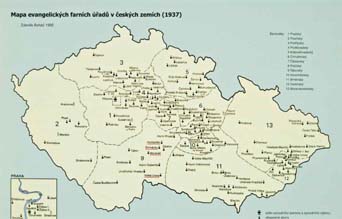
- Map of Czech Brethren and German Lutheran Registers. These were scattered congregations, since the state church was Roman Catholic. So you really need to have another window open with Google Maps or Mapy.cz in order to understand this map and figure out where these places are in relation to your town of interest. Because they were scattered, the records of the people of your town may be a fair distance from the town. The red parishes are Czech Brethren parishes and the dark green parishes are the German Lutheran parishes for which the records are available for download (see below) from the Zámrsk archive web site.
- Map of civil districts of 1938. The blue dots are district offices, and the black dots are district courts.
- "Download" - This used to be the link that really takes you to the detail about the parish registers (except for the Catholic parishes in dark green on the map (see above)), but it no longer works on the English page: see Step 3 below for how to do the download of the PDF file of the latest inventory.
- "Online" - This used to be a link to FamilySearch page, which is covered in the last of these information boxes below. This is an alternate way to search, but it does not let you download the PDF file of the entire registry, which really is a nice thing to have, since it allows much more rapid offline searching instead of the one-page-at-a-time online searching via FamilySearch. However, if your Catholic parish is in dark green on the first map (above), then the only place that you can find the images of the parish registers is on FamilySearch, in which case skip the rest of this information box and go to the FamilySearch information box below. This link no longer works on the English page, since FamilySearch has changed their URL, and the Zamrsk archive English page has not been updated for this nor for the Zamrsk archive inventory. To see the correct link from the English page, click on the "Parish registers" link and then scroll down to where you see a link that has "Family Search" in the text, and click on that link.
Step 3 - The "Download" link
The "Download" link is supposed to open a huge PDF file -- more than 1,600 pages. But the English page is not being kept up to date. So you have to find the link to the current PDF file of the inventory via a Czech link. From the English page, click on the "Parish registers" link. This will take you to the mostly Czech "Matriky" web page. The text at the top includes a link with the text "Inventární seznam Sbírky matrik Výchdočeského kraje 1587-1949". Click on that link, and you will be taken to another Czech web page, about the inventory. There you will see a tri-lingual link which includes "inventory of parish registers". The link is followed by the date that the current inventory was posted.
You can either left-click on the link to open the PDF file online or right-click on it so that you can download the entire PDF file to your computer to search it offline. I very much recommend the offline search, since it will let you navigate through this huge file a lot more quickly.
As of the last time I downloaded the file, the Catholic records are on pages 1-1557, and the Czech Brethren and Lutheran records are on pages 1558-1664. You definitely want to use the PDF search feature, since this is an enormous document. I search for the parish that I found on the maps, making sure that I am only looking at the pages in the section of the appropriate religion. Using the PDF search no longer requires that you use the correct diacritical marks.
The towns covered are in italics at the top of the first page of their section. The specific registers (matriky) then follow this text-block. For those that are digitized, there will be a URL for a ZIP file as the last entry for the register. Click on the URL to begin the download of the zip file.
The zip file contains every page of the register, with one JPG file for every pair of facing pages. Each JPG file is about 1.6MB. So the entire ZIP file can easily be on the order of 600MB and take as long as two hours to download, even with a powerful computer and excellent high-speed internet connection. But once you have this downloaded, it is very much worth having waited for.
Once the zip file has downloaded, you must then extract the JPG files from the zip file, and you can then finally begin to search for specific records among the images. I like to use the free PDFill tools to combine all the individual JPG images into a single PDF file and then do my searching in the PDF file.
|
Northern Bohemia Archive at Litomerice
- Web Site Languages
- Areas Covered
- Northern Bohemia (Ústecký Kraj, Liberecký Kraj)
- Registration Required: No
The “Vital records search” near the top right is the place to find life event records. Click on that link, and then click on the “Archivní VadeMecum - Vital records search” link and then click on the image of the front cover of a book. You are then at a good introduction to the search. You can click on the Search tab to begin the search for a town. There you can either pick the town from a list or enter it in the LOCATION box (without diacritical marks) at the top left of the screen. The results are listed in the box at the bottom half of the screen.
|
Prague City Archive
- Web Site Languages
- Areas Covered
- Registration Required: No
Click on the “Online Resources” tab at the top center of the page. This takes you to a page that includes a link to "Parish books". These are merely inventories; there is no access to online records. But it does show the coverage. The link to view the images of the books is the “Catalogue” link (upper left of the Online Resources screen). This takes you to an introductory page. If you click on the underlined words “The catalogue of the city archives of Prague” at the beginning of the text or on the “Search the Catalog” button, you are then taken to a page that lists all the types of records. You could have reached this same page from the main page of the Archive by clicking on the "Digital Collections" link, but then you would not have seen these other pages of very useful background information. But after the first time, you will probably want to use the direct "Digital Collections" link.
Click on the “Collection of Registry Books”. Then click the “Browse and Search” tab, where you can burrow down through the hierarchy of registers (Matriky) to find the one that you want.
|
Czech Silesia and Northern Moravia
- Web Site Languages
- Areas Covered
- Moravskoslezský Kraj
- Olomoucký Kraj -- all but the southwesternmost district
- Zlínský Kraj -- only the northeasternmost district
- Registration Required: No
Choosing several towns and registers at random, it appears that there are as yet very few digitized records available online, since none of them had links to view images. In fact, I found the site frustrating. They have a link to a PDF file of digital duplicates, but when I searched on one of the locations in the file by entering it, both with and without diacritical marks, the search found nothing. So I am unable to find any online images. The introduction indicates that there are some, but they appear to have much digitization work ahead of them.
|
FamilySearch.org
- Web Site Languages
- Areas Covered
- All - church Books: There are small (under 50,000 names) indexes to births/baptisms, marriages, and church books. The church book image collection currently has more than 300,000 images of Catholic and Jewish records. The records appear to be mostly from northern Bohemia.
- Northern Moravia (Regional Archives at Opava)
- Land Records: Images only (about 50,000)
- Church Records: Images only (over 200,000) - Catholic, Jewish, Lutheran
- Southern Bohemia (Regional Archives at Třeboň)
- Nobility Seignorial Records: Images only (about 6,500) - 1664-1698
- Church Records: Images only (almost 150,000) - Catholic, Jewish
- Registration Required: No
|
|
UAZK Property (Cadastral) Maps
The UAZK (Ústřední Archiv Zeměměřictví a Katastru = Central Archive of Surveying and Cadastry) web site has many maps. One collection is the cadastral (property definition) maps, which date to the 1840's and show who owned each tract or parcel of land. These can be very valuable for finding your ancestors' location, particularly for those places where the numbering system has changed and you only have the old house number.
Using the site is a bit difficult, since there is no overall search capability. But if you know the town for which you are looking, you can follow these instructions to locate the map of the town.
Instructions for Finding UAZK cadastral map of a specific town
- Go to http://archivnimapy.cuzk.cz
- Click on the "Stabilní katastr" link on that small map.
- This will (eventually) open a map of the Czech Republic. It has the very long URL http://archivnimapy.cuzk.cz/mapy/map.phtml?dg=co_rastr_1000k,MCR500_op,P_COCM_u&me=-958775.556739,-1282635.97206,-400169.80851,-872110.327503&language=cz&config=cio&resetsession=ALL
In the URL, change the "language=cz" to "language=en" and press Enter to go to this revised URL, which will have all the text in English.
- You can navigate to your town by clicking repeatedly on the magnifying glass cursor, if you know where it is located. (Be prepared for it to be slow loading each anlargement.)
Alternately, you can search for the town by name. At the top left, click on the downward-pointing arrowhead in the "Search for" box. Click on the first one "Názyv - Geonames Česká rep
ublica". This will open a window to the right, labeled "Geonames". Enter the name of your town in the box (correct diacritical marks ARE required - see a method below for obtaining this via Google Maps) and click Search. This may not show anything for a minute or so, but eventually a box will pop up with your town, which could have several variants. Choose the right one (usually the one with nothing in the "jmeno_n" column) and click on the magnifying glass to the left of the name. This will take you to the town, which will be shown as a blue dot within an outlined area. At this point, you can close the popup window, if you are at the right town.
- At the right, there is an icon bar. Click on the icon of the letter "i" inside a small box. (If you mouse over the icon, you will see that it is "Select".) Then click the cursor on the blue dot where your town is.
- This will open a new popup window, which will have one or more towns shown. Click on the "mapa" link to the left of your town's name.
- This will open a window with several rows of map thumbnails. These are labled skici (sketch - really a complete town plan), přehl (overview), otisky (prints - the individual sections of the overall sketch), and katastr (cadastre - takes you to a zoomable topographic map). The map you really want is the sketch. So click on the "skici" map. But the cadastre map has the (apparently modern) land divisions (which are very like the old ones) overlaid on top of a modern aerial view -- a wonderful tool (click the button at the top for "katastrální mapa + ortofoto").
Instructions for Using Google Maps to find correct diacritical spelling
The search by name in the steps above requires that the town name have the correct diacritical marks. The easiest way to obtain this is via Google Maps.
- Open a separate window and go to maps.google.com.
- In the Google Maps search box, type your town name, with the correct spelling but without the diacritical marks. Google will suggest town names, and you can then click on the correct suggested name. This not only gives you the map of your town, but it also enters your town's name -- with the correct diacritical marks -- in the Google Maps search box.
- Now, use the Windows copy and paste features to copy the name from the Google Maps window and paste it into the search box on the UAZK web page.
- Use your mouse to highlight the name of your town in the Google Map search box (just the town name). Then hold down the "Ctrl" key and also press the "Insert" key to copy the town name to the Windows clipboard.
- Now go to the UAZK web page with the map of Bohemia, and in the "Geonames" box, click the cursor, and then while holding down the "Shift" key, press the "Insert" key to paste the name into the search box.
- Then click the Search button and pick up the instructions above in the place where Google Maps is referenced.
|
|